 GroovSide
Settings
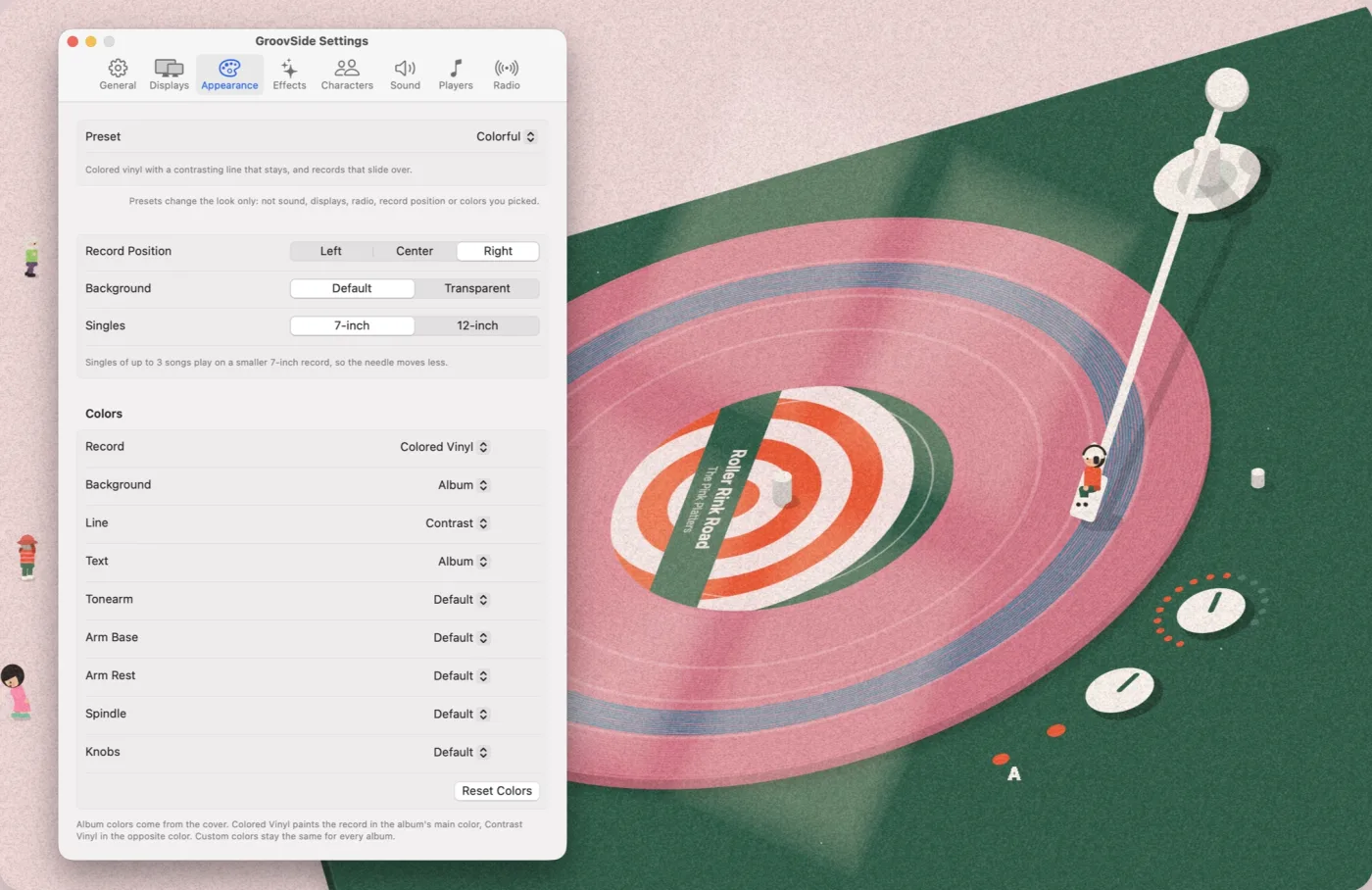
What each setting in GroovSide does. In the app, click the record icon in the menu bar and choose Settings… to open it. The window below works the same way: click a tab to see its settings, and point at a row to read what it does.
Auto uses 30 fps on battery and 60 fps when plugged in.
Show the record on these displays.
Presets change the look only: not sound, displays, radio, record position or colors you picked.
Singles of up to 3 songs play on a smaller 7-inch record, so the needle moves less.
Colors
Album colors come from the cover. Colored Vinyl paints the record in the album's main color, Contrast Vinyl in the opposite color. Custom colors stay the same for every album.
Light through a window follows the time of day.
How the record moves when the next song is on the other side of the same record.
How the record changes when the next song is from another album. Slide Over slides the old record out to the left and brings the new one in from the left, over it.
When the scene starts turning to the new album's colors: as the new record comes in, or once it settles onto the platter.
Rider
The little one on the needle. On Auto the pose sometimes changes when a new song starts.
Rider Colors
Crowd
The longer the music plays, the more friends drop by. When the music stops they head home one by one. Crowd Pace makes them come and go faster.
Quiet record player sounds over your music. Played on the main display only, and paused when the screen is locked or covered.
The needle touching down and lifting off, a record lifted, slid and set down.
The platter spinning up and winding down.
A soft hiss and crackle while the needle is in the groove.
A DJ spinback while you rewind a song in Music. Its volume is set apart from the other sounds.
The same spin, a little brighter, while you fast-forward a song in Music.
GroovSide needs permission to read what Music or Spotify is playing.
Each song plays on its own album's record.
One record for the station. Each song plays on the next band, and the record turns over when a side is full.
The label is the picture Music gives for the song: usually its cover, sometimes the station's logo.
The label is always the station's logo.
For live radio stations in Music.
A web copy of the Settings window. Changing things here doesn’t change the app.
General
- Show on Desktop
- Shows or hides the turntable. The same switch is in the menu bar menu.
- Open at Login
- Opens GroovSide when you log in to your Mac. If macOS asks for approval, Login Items in System Settings opens.
- Frame Rate
- How many times a second the scene is drawn. Auto uses 30 fps on battery and 60 fps when plugged in. 30 fps uses less power.
- Clear This Record
- Erases the lines the needle has drawn on the record that is playing now. Other records keep theirs.
- Version
- The version you have. The App Store keeps it up to date.
Displays
- Your displays
- Each connected display gets its own switch. A display you turn off stays off, even after you unplug it and plug it back in. (Main) marks the display with the menu bar. The names here are examples; you’ll see your own.
Appearance
- Preset
- Five ready-made looks. A preset sets the background, the effects, the visitors, and the vinyl and line styles in one go. It leaves sound, displays, radio, record position and your custom colors alone. Change one of those settings yourself and it shows Custom.
- Classic The way it comes: album colors, window light, a fading trail and visitors.
- Colorful Colored vinyl with a contrasting line that stays, and records that slide over.
- Lively Colored vinyl, a busier crowd, records that slide over and lines that stay.
- Calm No visitors, lighter grain, and only the needle moves between sides.
- Minimal Just the turntable on your own desktop: no background, light, grain or visitors.
- Record Position
- Puts the turntable on the left, in the center or on the right of the screen. On the left, the song details move to the top right.
- Background
- Default draws the room, the desk and the turntable’s base. Transparent draws only the record, tonearm, knobs and song details over your own desktop picture, without window light or visitors.
- Singles
- 7-inch plays singles of up to 3 songs on a smaller record, so the needle moves less. 12-inch plays them on a full-size LP. A record already on the turntable keeps its size.
- Record
- The record’s color. Album takes it from the cover, Colored Vinyl uses the album’s main color and Contrast Vinyl the opposite color. Custom shows a color well and keeps one color for every album.
- Background
- The color around the turntable. The song details switch between light and dark text to stay readable.
- Line
- The line the needle leaves on the record. Album uses the cover’s accent color, Contrast its opposite. Lines already drawn keep their color.
- Text
- The color of the song details.
- Tonearm
- The arm, counterweight, headshell and needle. Default is metal.
- Arm Base
- The round plate under the tonearm.
- Arm Rest
- The rest the needle sits on when it isn’t playing.
- Spindle
- The pin in the middle of the record.
- Knobs
- The volume and speed knobs.
- Reset Colors
- Puts every color in this group back to its default. It’s dimmed when nothing has changed.
Effects
- Window Light
- Sunlight through a four-pane window falls across the desk and follows your Mac’s clock: peach at dawn, orange at sunset, deep blue at night. Not shown with a transparent background.
- Trail
- Keep leaves the needle’s line on the record, so each record builds up its own drawing. Afterglow shows only a short tail that fades behind the needle. The full line is still saved, so switching back to Keep brings it back.
- Grain
- How strong the paper-like grain over the scene is.
- Side Change
- When the next song is on the other side of the same record. Lift & Turn lifts the record, gives it a half turn while the new side fades in, and sets it down. Swap Record changes it the way a new album does. Needle Only leaves the record and moves just the needle.
- Album Change
- When the next song is from another album. Swap Record lifts the old record off to the right and brings the new one in from the left. Slide Over slides the old record out to the upper left and glides the new one in over it.
- Color Change
- When the scene starts blending to the new album’s colors. With Record: as the new record comes in. On Landing: once it settles onto the platter.
Characters
- Pose
- The little rider on the needle: Sit, Lean Back, Cross-Legged or Hug Knees. Auto sometimes picks a new pose when a new song starts.
- Shirt
- Album uses the cover’s accent color.
- Pants
- Album matches the turntable’s base.
- Hat
- Default is white.
- Reset Colors
- Puts the rider’s colors back to the defaults.
- Crowd
- Little visitors drop by the longer you listen: the first after a few minutes, up to six at a time. Each stays a while, and when the music stops they wave and head home one by one. Not shown with a transparent background.
- Crowd Pace
- Makes visitors come and go 2, 5 or 10 times faster, and speeds up their walking and moves. Dancing still follows the music.
Sound
- Record Sounds
- Soft turntable sounds, made on the fly and played over your music. Off until you turn it on. Only the main display plays them, and they stop while the screen is locked or asleep.
- Volume
- How loud all of these sounds are.
- Needle & Record
- The needle touching down and lifting off, and a record being lifted, slid and set down.
- Motor
- The platter spinning up when you play and winding down when you pause.
- Surface Noise
- A soft hiss and crackle while the needle is in the groove and music is playing.
- Rewind · Rewind Volume
- A DJ spinback while you rewind in Apple Music, with its own volume, up to 1.5 times.
- Fast Forward · Fast Forward Volume
- The same spin, a little brighter, while you fast-forward in Apple Music, with its own volume. Spotify doesn’t report rewind or fast-forward, so these stay quiet there.
- Play Test Sound
- Plays the needle drop once, even when Record Sounds is off.
Players
- Music · Spotify
- Whether GroovSide may read what each app is playing. macOS asks the first time you play a song. If you declined, it says Not Allowed in red. GroovSide only reads; it never controls your music or opens either app.
- Open Automation Settings…
- Opens Privacy & Security ▸ Automation in System Settings. Turn on Music or Spotify under GroovSide there.
Radio
- Record
- For live radio stations in Apple Music. Each Song puts every song on its own album’s record. Station keeps one record per station: each song plays on the next band, and the record turns over when a side is full.
- Label
- From Music uses the picture Music gives for the song: usually its cover, sometimes the station’s logo. Station Logo always shows the station’s logo.
In the app
From the menu bar
Click the record icon in the menu bar for the song that’s playing, Show on Desktop, Clear This Record, Settings… and Quit. When Music and Spotify are both open, Player lets you choose which one the record shows. If GroovSide isn’t allowed to read a player, Allow Control of Music… appears too.
Still stuck? See Support.